Yealink Video Conferencing

Yealink Video Conferencing
for every budget!
Yealink is a globally leading provider of Unified Communication & Collaboration solutions, specialising in video conferencing, voice communication, and collaboration. With the best quality, innovative technology, competitive pricing, and user-friendly products,Yealink is in the global top 5 of suppliers for video conferencing solutions.
Yealink video conferencing systems enhance collaboration experiences, whether you are working from home, at your workplace, or at another location. With Yealink video conferencing equipment, you enjoy superior audio and video quality, allowing everyone to see and hear each other exceptionally clearly.
Check out the Yealink product range below or request your free demo.
MeetingBar Series
All-in-One Video Bar

Plug-and-play, easy to use! Yealink equipment for video collaboration makes professional meetings simple and provides a one-stop solution for all your hybrid workplace needs.
UVC Camera Series
Intelligent USB Meeting Device

Take your meetings to the next level with a 4K PTZ conference camera featuring advanced auto framing and tracking technology. Experience crystal-clear high-definition video conferencing where every detail is captured.
Microsoft Teams Room Kits
Smart Meeting and Collaboration

Yealink and Microsoft Teams redefine the hybrid work experience. Choose between a 'Windows Teams Rooms' or 'Android Teams Rooms' setup to enjoy an immersive meeting experience with flexibility.

MeetingBar Series
Plug-and-Play
Yealink's Android all-in-one video bars are super easy to set up and use. Whether you are using Microsoft Teams Rooms (MTR) or Bring Your Own Device (BYOD), your video bar is always ready for meetings.
AI-Powered Video and Audio
With Yealink's Android solutions, you get top-level AI-powered video and audio! With features like auto framing, speaker tracking, multi-focus framing, and noise suppression, everyone gets a leading role in the meeting.
Wireless Meeting Experience
Enjoy a wireless meeting with Yealink Android-based solutions. Wireless accessories like the WPP30 presentation pod and VCM36 wireless expansion microphones free the meeting table from messy cables!
Leading video platforms available
Various mainstream video platforms are supported, such as Microsoft Teams and Zoom. No matter which platform you use, start your meeting now!
UVC Camera Series
Scalable
These cameras can be connected via USB to a Windows computer, allowing your meeting room to be set up scalably with additional cameras, microphones, and speakers. With the AV Hub, multiple meeting rooms can even be combined, all through simple UTP cabling.
AI-Powered Features
Many of the cameras support AI features such as auto-framing, speaker tracking, and presenter tracking. These features help to automatically adjust the focus based on who is speaking or how the participants are moving.
Wide Field of View
Most models have a wide field of view, ranging from 90° to 120°, which is ideal for capturing all participants in a meeting room.
Compatibility
The cameras are compatible with most UC platforms such as Microsoft Teams, Zoom, and Skype for Business, ensuring versatility in use.
Easy Installation and Management
Yealink cameras are designed for easy installation and can often be mounted in various ways, such as on a wall, ceiling, or tripod. They also support remote device management for easy remote administration.


Microsoft Teams Room Kits
The Yealink Microsoft Teams Room Kits are designed to seamlessly integrate video meetings with Microsoft Teams and offer many interesting features.
AI-driven Video
Many of the Yealink Teams Room Kits are equipped with AI-driven features such as auto-framing, speaker tracking, and presenter tracking. This ensures that the camera automatically follows the speaker and provides the correct framing.
Premium Audio
The kits offer an excellent audio experience with features such as AI-driven noise cancellation, full-duplex audio, and built-in microphone arrays. This ensures clear and distinct communication during meetings.
Wireless Content Sharing
With the Yealink WPP30 wireless presentation pod, you can easily share content from your laptop with the press of a button. This makes sharing presentations and documents during meetings very straightforward.
Device Management Platform
Yealink offers a device management platform that allows users to manage, monitor, configure, update, and diagnose their devices remotely. This makes managing multiple meeting rooms simpler and more efficient.
Accessories
BYOD
extender

The Yealink MVC-BYOD-Extender supports the transformation between Microsoft Teams Rooms (MTR) and various types of UC platforms. Bring your own device, connect the extender USB cable to the laptop, and start your video meeting. This device supports audio and video devices and provides a plug-and-play solution.
Wireless
presenting

The wireless presentation pod WPP30 brings a seamless content-sharing experience to any meeting room. With Plug & Play, you can share content instantly, and thanks to the multi-screen presentation, up to 4 people can share simultaneously. No extra software or drivers are needed, just connect the WPP30 to the devices and you're ready!
Microphones
Speakers

Yealink wired and wireless microphones provide clear and reliable audio recording with features such as noise cancellation, 360° voice pickup, and Full-Duplex Technology, allowing sound to be sent and received simultaneously. The wired and wireless speakers offer excellent sound quality and are compatible with various UC platforms such as Microsoft Teams.
Audio/Video
Hub

The AVHub is an advanced audio and video processor designed for large rooms. It supports multiple cameras simultaneously, offers various camera angles, and better coverage. With a powerful AI chipset, it is ready for future applications such as 'together mode' in Microsoft Teams. The AVHub processes audio and video directly, reducing the load on your PC. Thanks to Power over Ethernet (PoE), installation is simple, cabling is streamlined, and central management is possible.
CTP18
control panel

The CTP18 is a user-friendly touch panel with an 8-inch touchscreen, allowing you to easily start, manage, and join Microsoft Teams or Zoom meetings. Thanks to Power over Ethernet, both power and data can be delivered via a single cable, simplifying installation. The CTP18 acts as a room controller to manage the following: mute/unmute, camera control, volume up/down, adjust layout, share content, activate or deactivate.
Divisible rooms
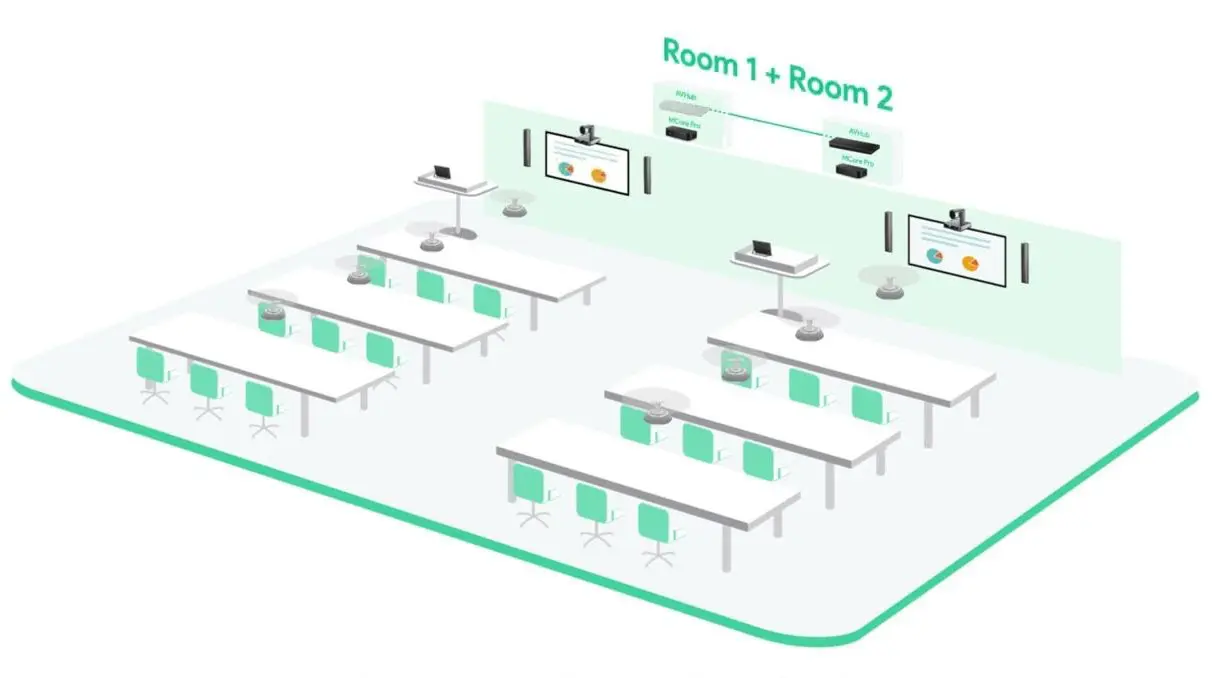
Yealink's solution for divisible meeting rooms makes it easy to manage the functionality of adjacent meeting rooms. With their MVC system, you can use two separate meeting rooms, each equipped with a full set of Yealink MVC devices, independently or combine them into one large space by removing the movable walls and linking the AVHub units.
The system offers a streamlined approach where you can enable the divisible space mode via the Yealink Room Connect software. This allows for flexible use of the spaces, depending on meeting needs.


Management Cloud Service
The Yealink Management Cloud Service (YMCS))is a powerful cloud-based platform for managing Yealink devices. It offers a range of features to simplify the management of devices in hybrid workplaces. With YMCS, you can easily deploy, upgrade, monitor, and troubleshoot devices, all remotely.
Real-time alerts:receive notifications for issues such as device failures or failed firmware updates.
Bulk management:perform updates and upgrades for multiple devices at the same time.
Security:based on Microsoft Azure, YMCS offers robust security and data protection.

Our customers
The following customers are already using Yealink Videoconferencing equipment



Stay informed with the IKANDA Newsletter
We respect your privacy. Your data will be treated confidentially.